How to Compare Affordable Website Design Packages
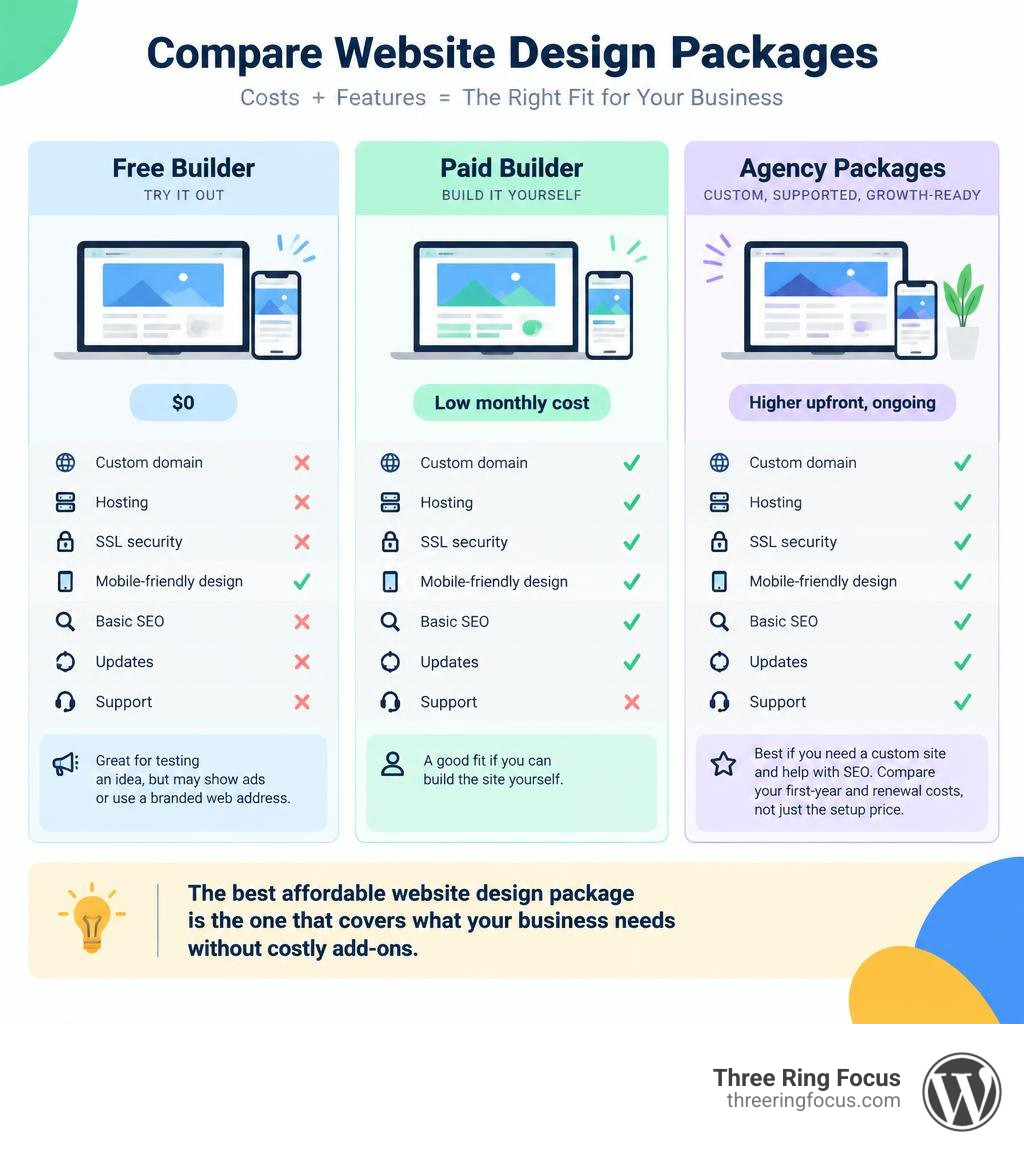
The best affordable website design package is the one that covers what your business needs without costly add-ons. A free builder can work while you test an idea, but it may show ads or limit you to a branded web address. A low-cost paid builder is a good fit if you can build the site yourself. If you need a custom site and help with SEO, compare agency packages by their full first-year and renewal costs, not just the setup price.
Check whether each quote includes a custom domain, hosting, SSL, mobile-friendly design, basic SEO, updates, and support. A lower starting price is not a saving if those essentials cost extra.
I’m Luke Wherry, Marketing Director at Three Ring Focus. Since founding the agency in 2009, I’ve helped local businesses connect affordable website design with SEO and marketing that fit their goals.
Affordable website design terms simplified:
Core Criteria for Affordable Website Design Packages
When you start shopping for a website package, headline prices can be dangerously misleading. A platform advertising a $3-per-month rate sounds like an absolute steal until you hit the checkout screen and discover that essential tools—like connecting your own domain or removing third-party ads—require upgrading to a higher tier.
True affordability is about total cost of ownership over your first three years of operation. In October 2026, consumer expectations are higher than ever. Research from retail industry studies shows that 26.5% of U.S. shoppers research brands online after learning about them in physical stores. If your digital storefront looks broken or loads like a dial-up connection from 1998, you are losing revenue before you even send your first invoice.
To ensure you get real value, evaluate every web design package against four core criteria:
- Upfront vs. Lifetime Costs: Does the entry tier lock you into an introductory rate that triples upon renewal?
- Feature Inclusions: Are security protocols, domain connections, and mobile layouts bundled into the base fee?
- Scalability: Can the platform support catalog expansions, custom forms, and increased traffic without forcing an entire redesign?
- Maintenance Overhead: Does the package require weekly manual updates on your part, or is ongoing technical health handled automatically?
Evaluating Affordable Website Design Features Without Hidden Costs
Navigating the feature lists of modern website platforms requires a sharp eye. Low-cost services often strip out fundamental necessities to advertise rock-bottom monthly figures.
When reviewing affordable website builders or evaluating custom agency solutions, verify that the following essentials are included in writing:
- SSL Certificates: A secure connection (HTTPS) is non-negotiable for search engines and consumer trust. Never pay an extra $50 to $100 per year for an SSL add-on.
- Custom Domain Registration: Look for packages that bundle a custom domain free for at least the first year (standard renewals run $10 to $20 annually).
- Uncapped Bandwidth & Storage: Entry plans on basic platforms (such as entry-level free tiers with 250 MB storage and bandwidth limits) can bottleneck your site as soon as traffic picks up.
- Integrated Business Email: Having an address like info@yourbusiness.com rather than a generic Gmail account builds instant credibility.
- Built-in SEO Tools: Ensure you have direct control over meta titles, meta descriptions, image alt tags, and clean XML sitemaps.

Website Infrastructure Included in Your Design Package
A website requires two fundamental pieces to function: a visual front-end that visitors interact with, and server infrastructure that stores your assets and serves them across the internet.
Many beginners confuse website builders with raw web hosting. Web hosting is the digital real estate where your files live. A website builder is the visual software layer sitting on top of that server. Proprietary builders combine both into a single subscription. However, if you choose an open-source platform, you will manage hosting and design independently.
Understanding the balance between CMS website design vs custom code helps determine your long-term flexibility. Proprietary drag-and-drop builders are convenient, but they lock you into their ecosystem—you cannot export your site files if you decide to leave. Open-source Content Management Systems (like WordPress) take slightly more setup time, but they grant you 100% asset ownership and database portability.
Comparing Affordable Web Design Package Types
To pick the right path for your business, you need to understand how the entry-level options on the market stack up against one another in pricing, renewal terms, and practical capabilities.
Here is a side-by-side breakdown of popular low-cost website package tiers as of October 2026:
| Platform / Package Tier | Introductory / Base Price | Renewal / Regular Price | Best Suited For | Key Limitation |
|---|---|---|---|---|
| Ultra-Budget Builder | $3.49 / month (12-mo term) | $10.99 / month | Ultra-budget quick launches | Limited design customization |
| Entry Domain & Site Plan | $4.99 / month (1-yr term) | $15.99 / month | Basic small business pages | Significant price jump on renewal |
| Creative Portfolio Tier | $5.40 / month (annual) | $6.00 / month | Photographers & creative portfolios | Limited advanced e-commerce tools |
| Basic Starter Package | $6.00 / month (annual) | $12.00 / month | Simple brochure websites | No permanent free trial option |
| Standard Small Business Tier | $12.00 / month (annual) | $16.00 / month | Simple small business shops | Limited modern template selection |
| Aesthetic Template Plan | $10.00 / month (annual) | $16.00 / month | Polished aesthetics & service pages | E-commerce transaction fees on lower tiers |
| Feature-Heavy DIY Suite | $17.00 / month ($204.00/yr) | $17.00+ / month | Feature-heavy DIY builds | Higher base entry cost; expensive add-ons |
Affordable Website Design for Small Business Portfolios and Local Services
If you operate a regional service business—such as plumbing, legal consulting, or commercial photography—your website has one primary job: convert local searchers into booked appointments.
For creative professionals, dedicated portfolio builders (starting around $5.40/month) offer tailored client galleries, proofing tools, and print integration right out of the box. For local contractors, simple drag-and-drop engines can get your contact information online in an afternoon.
However, an eye-catching design does not guarantee search traffic. To turn website visits into actual phone calls, you must focus on building a powerful local SEO website design that ranks on page one. That means structuring your pages around localized schema markup, creating dedicated service-area landing pages, and integrating frictionless click-to-call buttons and booking calendars.
Low-Cost eCommerce Packages for Growing Online Stores
Selling physical or digital goods online introduces technical requirements that standard portfolio packages do not cover. An e-commerce package must securely handle payment gateways, inventory management, automatic tax calculations, and SSL-encrypted checkout funnels.
When reviewing budget e-commerce plans, pay close attention to transaction fees. Entry-level builder tiers often charge an additional 2% to 3% fee per transaction unless you upgrade to dedicated commerce tiers.
Driving sales requires more than just listing products; it requires intuitive user journeys. Understanding the difference between a pretty website and a successful one will save you months of lost sales. A budget online store must prioritize fast-loading product images, straightforward mobile checkout flows, and automated abandoned-cart recovery emails.
Entry-Level Packages: When to Upgrade
Free and bottom-tier website plans serve a purpose: they let you test an idea without financial risk. But running a commercial business on a free tier long-term can harm your brand reputation.

You should upgrade from a free or entry-level package immediately if:
- Your URL looks unprofessional: Operating under yourbusiness.freebuilder.com signals to prospective customers that you may not be an established enterprise.
- Platform Ads distract your buyers: Free tiers display third-party banner ads that siphon attention away from your offers.
- You hit storage or bandwidth caps: Running out of server space breaks product image uploads and slows down page rendering.
- You need custom tracking pixels: Basic plans frequently block custom JavaScript, preventing you from running targeted Google or Meta ad campaigns.
How to Build a High-Performing Site on a Budget
Creating an effective website on a budget does not mean cutting corners on user experience. Good design relies on timeless visual principles—clean spacing, clear typography, and logical page structures—none of which require enterprise-level budgets.
Focusing on responsive web design ensures your layout automatically adapts whether a customer visits on an iPhone, an Android tablet, or a 27-inch desktop monitor.
Essential Design Rules for Professional First Impressions
Visitors form an opinion about your business within milliseconds of landing on your homepage. Avoiding 5 mistakes that are killing your website’s first impression starts with sticking to these fundamental design rules:
- Establish a Clear Visual Hierarchy: Place your core value proposition and primary call-to-action (CTA) above the fold. Visitors should never have to guess what you do.
- Limit Your Color Palette: Use no more than three primary colors: a base neutral for backgrounds, a strong dark shade for readable text, and a vibrant accent color reserved exclusively for buttons and links.
- Maintain Generous White Space: Cluttered layouts overwhelm readers. Give your headlines, paragraphs, and imagery room to breathe.
- Optimize Image File Sizes: Compress all photography before uploading. Large, uncompressed files ruin load speeds and hurt your search rankings.
Avoiding Post-Launch Traps: Renewal Rates and Add-On Fees
The most common mistake small business owners make when choosing a budget package is ignoring long-term renewal fees. Many platforms offer massive introductory discounts for your first 12-month billing cycle, only to spike prices drastically in year two.
For example, an introductory starter plan advertised at $4.99/month for year one often renews at $15.99/month. Similarly, promotional $3.49/month tiers frequently jump to $10.99/month or higher after the initial promotional period. If you budget based solely on introductory rates, you may face unexpected cash flow surprises down the road.
Furthermore, ignoring ongoing upkeep can lead to expensive emergency repairs. Knowing what happens if you don’t have website maintenance—from security vulnerabilities to broken forms—helps you determine whether a fully managed agency package ultimately provides better financial protection than a hands-off DIY tool.
Frequently Asked Questions About Affordable Web Development
What is the least I can pay to get a professional website online?
To launch a professional, ad-free website with a custom domain, the minimum baseline cost is approximately $50 to $80 for your first year.
This includes choosing an entry-level hosting and builder plan (typically starting between $3.50 and $6.00/month), which generally bundles a free custom domain and an SSL certificate for the first 12 months. After the first year, expect ongoing baseline operating costs to average $100 to $180 annually once standard renewal rates take effect.
Do I need technical skills or coding knowledge to launch a budget website?
No. Modern budget website builders use intuitive visual drag-and-drop interfaces and AI-assisted onboarding wizards. These systems can generate initial layouts, suggest color pairings, and write draft copy based on a few basic questions about your business.
However, while building basic pages requires zero coding knowledge, optimizing those pages for search engines, configuring DNS records, and creating high-converting sales funnels still requires strategic planning.
How do professional web design packages compare in long-term ROI?
While DIY builders offer low initial startup costs, they require dozens of hours of personal labor and often leave technical SEO, custom analytics, and conversion optimization on the table.
Reviewing why you need a professional web designer highlights the distinct advantages of a dedicated build: tailored brand positioning, superior site speeds, scalable codebases, and proactive marketing integration. For businesses ready to generate sustained local leads, a professionally built site frequently pays for itself multiple times over through higher search rankings and improved lead conversion rates.
Conclusion

Cutting your development costs in half does not mean settling for a second-rate digital presence. By understanding your actual feature requirements, monitoring renewal price jumps, and selecting packages that bundle essentials like SSL, custom domains, and responsive frameworks, you can establish a powerful online presence while keeping your overhead low.
Whether you decide to assemble a quick DIY site using a budget website builder, or you prefer a comprehensive partner to handle design, local SEO, and marketing under one roof, focus on long-term value over short-term shortcuts.
If you are ready to elevate your business with a high-performing digital foundation, explore our results-driven web design and marketing solutions at Three Ring Focus. We combine custom design, targeted search optimization, and integrated marketing to help your brand grow efficiently.