
What Is Front End Web Dev and How Does the Modern Web Work?
Front-end web development focuses on the client side of the web—everything a user directly touches, clicks, reads, and navigates inside their browser. When you visit a website, your browser requests files from a server across the globe. Once those files arrive, the browser executes a complex parsing process: it reads the raw markup, constructs a Document Object Model (DOM) tree alongside a CSS Object Model (CSSOM), merges them into a render tree, computes the layout geometry, and finally paints the pixels onto your screen.
Understanding this client-side architecture transforms how you write code. Rather than blindly assembling layouts, a skilled front-end engineer structures code to assist browser execution, optimize user experience, and ensure seamless interaction. You can begin exploring these fundamentals with structured roadmaps like Learn web development on MDN.
Front-end developers spend their days orchestrating how data changes on screen in response to user inputs. This requires mastering DOM manipulation, understanding the browser’s single-threaded event loop, and ensuring that animations and network requests never block the main thread.
The Core Building Blocks: HTML, CSS, and JavaScript
Every web application relies on three foundational pillars:
- Semantic HTML5: Provides structural meaning, content hierarchy, SEO indexability, and baseline accessibility for assistive technologies like screen readers.
- Modern CSS: Controls typography, spatial relationships, color schemes, responsive breakpoints, transitions, and hardware-accelerated animations using tools like CSS variables.
- ES6+ JavaScript: Implements application logic, asynchronous programming via Promises and async/await, state management, and real-time DOM manipulation.
When these three technologies collaborate, HTML lays the foundation, CSS delivers aesthetic styling, and JavaScript handles dynamic functionality.
Front End vs Back End vs Full Stack Development
Building modern web applications requires distinct disciplines across the software stack. Understanding these boundaries helps you decide where to specialize:
| Aspect | Front-End Development | Back-End Development | Full-Stack Development |
|---|---|---|---|
| Primary Focus | User interface, user experience, browser rendering, accessibility | Server logic, databases, authentication, API architecture | Complete end-to-end web application lifecycle |
| Core Technologies | HTML5, CSS3, JavaScript, TypeScript, React, Vue | Node.js, Python, Java, PostgreSQL, MongoDB, Redis | Front-end libraries, back-end runtimes, relational & NoSQL databases |
| Execution Environment | Client browser | Cloud infrastructure, web servers, serverless runtimes | Both client and server environments |
| Primary Goal | Intuitive, accessible, and high-performance UI interaction | Secure data persistence, business logic, system scalability | Unified delivery of features from database to user interface |
While back-end developers manage databases and secure REST APIs, front-end engineers ensure data arriving via network endpoints renders smoothly for the user. When teams evaluate technical directions, such as weighing custom code vs CMS web design, front-end expertise ensures the final interface remains fast, scalable, and responsive.
Essential Skills and Frameworks for the Modern Developer
Once you are comfortable with core syntax, the next milestone is learning modern ecosystem tools. Production engineering relies on component-driven design, modular state handling, and automated build tools. Free structured tracks on platforms like Frontend TechLead can help you transition from basic scripts to complex single-page applications.
Choosing a Front End Web Dev Framework: React, Vue, and Angular
Frameworks provide structured systems for managing dynamic UI state, rendering complex interfaces efficiently, and building modular codebases:
| Feature / Metric | React | Vue.js | Angular |
|---|---|---|---|
| Architecture Type | Component-based UI library (JSX) | Progressive, approachable framework (SFC) | Comprehensive, opinionated enterprise framework |
| State Management | Built-in hooks (useState), Context, Redux, Zustand |
Built-in reactivity system, Pinia | RxJS observables, Signals, NgRx |
| Rendering Strategy | Virtual DOM, Server Components (Next.js) | Virtual DOM, SSR (Nuxt) | Incremental DOM, SSR (Angular Universal) |
| Learning Curve | Moderate (requires strong JavaScript and JSX foundation) | Gentle (clean separation of HTML, CSS, script) | Steep (TypeScript, decorators, dependency injection) |
| Industry Adoption | Dominant across enterprise and startup ecosystems | Popular in medium-sized projects and global teams | Standard in enterprise, finance, and large corporate environments |
React remains an industry standard due to its expansive ecosystem and widespread enterprise adoption. Vue offers an approachable onboarding path with structured Single File Components, while Angular provides an all-in-one architecture suited for large corporate organizations.
Tooling, Version Control, and TypeScript
Professional development workflows rely on specialized tooling:
- Version Control: Git and GitHub manage versioning, branch features, and enable collaborative pull request reviews.
- Static Typing: TypeScript introduces interfaces, custom types, and compile-time error checks to prevent runtime bugs in large applications.
- Build Tools & Bundlers: Modern build tools like Vite bundle modular code, compile assets, and provide near-instantaneous Hot Module Replacement during development.
- Deployment Pipelines: Continuous Integration and Continuous Deployment (CI/CD) pipelines automate testing and deploy production builds to hosting platforms.
Building Fast, Responsive, and Accessible Web Experiences
A high-performing website must work reliably across every screen size, browser engine, and network condition. Incorporating the essential elements of a successful website means combining visual appeal with rock-solid engineering.
Responsive Layouts and Modern CSS Innovations
Modern styling has moved far beyond rigid pixel values. Embracing responsive web design ensures your interface adapts naturally across various devices. Modern CSS includes several powerful layout tools:
- Flexbox: Efficiently aligns items along a single axis, perfect for toolbars, badges, and interface controls.
- CSS Grid: Handles two-dimensional layouts, defining structured rows and columns simultaneously.
- CSS Subgrid: Lets nested child elements align directly to their parent grid tracks across all major browser engines.
- Container Queries: Applies styling rules based on the size of a parent component rather than the global viewport width.
- Modern Color Spaces: Utilizes vibrant gamut functions like
oklch()andcolor(display-p3)for vivid color rendering. - CSS Anchor Positioning: Dynamically tethers floating menus, tooltips, and popovers to specific reference elements without heavy JavaScript calculations.
Web Accessibility and Core Web Vitals Optimization
The web should be usable by everyone. Implementing web accessibility best practices ensures full compliance with WCAG standards through proper color contrast, keyboard navigation, and meaningful ARIA semantics.
At the same time, optimizing rendering metrics and improving your website speed directly enhances user engagement and organic search visibility. Google tracks technical performance through Core Web Vitals:
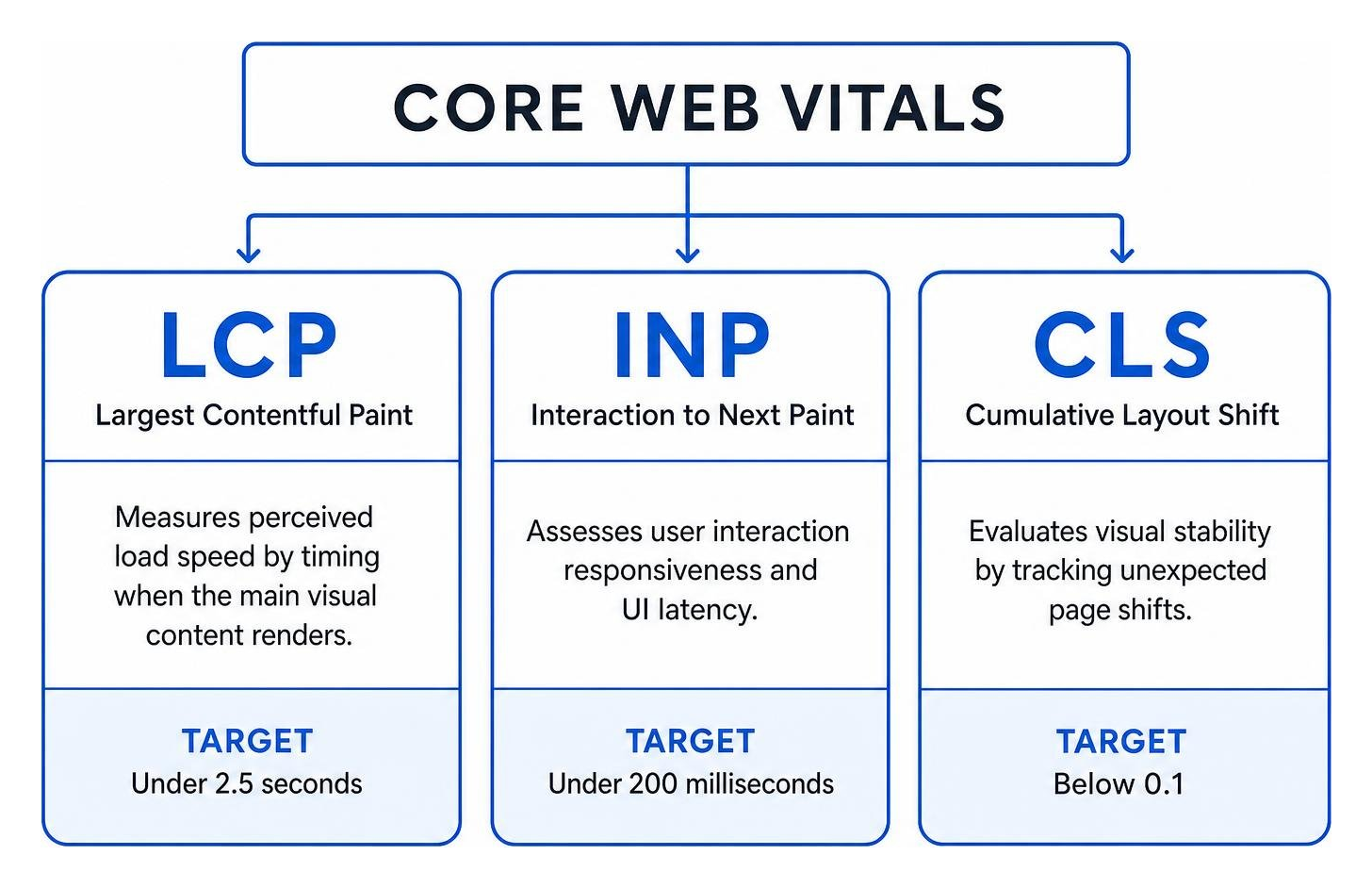
Developers follow web.dev performance guidelines to optimize these key thresholds:
- Largest Contentful Paint (LCP): Measures perceived load speed by timing when the main visual content renders. Aim for under 2.5 seconds.
- Interaction to Next Paint (INP): Assesses user interaction responsiveness and UI latency. Target under 200 milliseconds.
- Cumulative Layout Shift (CLS): Evaluates visual stability by tracking unexpected page shifts. Keep scores below 0.1.
Roadmap and Career Strategies for Aspiring Developers
Building a successful career in front-end development requires a practical, project-focused approach. Whether you choose self-directed study or a formal track like the IBM Front-End Developer Professional Certificate, steady practice and portfolio building are key.
Accelerating Your Front End Web Dev Learning Path and Portfolio

Your portfolio serves as direct proof of your technical abilities. When building projects to showcase to employers or prospective clients:
- Solve Real-World Problems: Build applications that fetch live API data, handle user authentication, and persist application state.
- Prioritize Code Cleanliness: Write modular components, include clear documentation, and maintain clean commit histories on GitHub.
- Deploy Live Demonstrations: Host fast, production-ready builds on cloud hosting platforms so hiring managers can test them immediately.
- Prepare for Technical Interviews: Practice explaining JavaScript closures, the event loop, state flow, and CSS layout algorithms in plain language.
Frequently Asked Questions About Front End Web Development
How long does it take to learn front end web development and get hired?
Most dedicated learners achieve foundational fluency in HTML, CSS, and basic JavaScript within 3 to 6 months of daily practice. Reaching job readiness—mastering a modern framework like React, version control with Git, TypeScript, and building a professional portfolio—typically takes 6 to 12 months.
Do I need a computer science degree to become a front end developer?
No. Front-end engineering prioritizes practical ability, clean code, and working projects over traditional academic credentials. Employers evaluate your GitHub repositories, live portfolio builds, and problem-solving skills during technical interviews.
What are the primary career paths and earning potential for front end developers?
Front-end developers can advance from junior engineers to senior developers, lead UI architects, engineering managers, or cross-disciplinary UX engineers. The discipline consistently ranks among the most sought-after technical roles worldwide, offering competitive compensation that scales with experience and technical depth.
Conclusion
Front-end web development connects creative visual design with technical problem-solving. By building strong fundamentals in HTML, CSS, and JavaScript, mastering modern frameworks, and prioritizing performance and accessibility, you can build engaging digital experiences that delight users.
At Three Ring Focus, we combine clean development with search engine optimization and digital marketing strategies to help businesses grow. Start building your first project today, keep testing and refining your code, and launch your journey into front-end development.